1. 부하테스트 구축
서비스의 응답 속도가 빠른 것을 넘어 부하가 발생했을 때 잘버티는지 확인하기 위해 K6, InfluxDB, Grafana 조합을 활용하여 모니터링을 시작했다. K6는 javascript를 사용하기에 다른 기술보다 배울 것이 적다고 생각했고, 또한 사용법이 간단하고 무료라는 점에서 처음 부하테스트를 시작하는데 부담이 없었다.
〽️ Grafana 대시보드 구축 트러블 슈팅
응답 시간 (Response Time, 처리량 (Throughput / RPS): , 가상 사용자 (Virtual Users), 에러 및 체크 성공률 (Errors & Checks), 데이터 전송량를 시각화한 Grafana Labs에서 공식적으로 제공하는 K6 Results (대시보드 ID: 2587) 템플릿을 사용하여 대시보드를 구축하였다. 하지만, 다음과 같은 에러가 발생했다.
에러에 대한 해결책은 다음 포스팅을 참고하였다. (https://github.com/grafana/grafana/issues/95320)invalid interval string, has to be either unit-less or end with one of the following units: "y, m, w, d, h, m, s, ms"
즉, 그라파냐 업데이트 문제였다. 그라파냐가 12.0.1 버전으로 업그레이드 되면서 발생하는 문제였다. 해당 문제가 1년 넘게 계속 발생함에도 불구하고, 아직 수정되지 않은 듯했다. 나는 11.6.1 버전으로 다운그레이드하여 해결하였다.
2. 부하테스트 고려사항
부하테스트를 진행하면서 가장 고려한 부분은, JWT 인증/인가부분이다. 이 프로젝트는 로그인을 제외한 모든 API 요청은 JWT 기반의 인증/인가 절차를 반드시 거치도록 설계되어 있다. 실제 서비스 환경에서 서버가 JWT 토큰을 검증하고 사용자 권한을 확인하는 과정을 그대로 반영하기 위해 부하테스트에도 동일한 환경으로 구현하기로 했다.
2-1. JWT 생성
K6은 다음과 같은 단계를 거쳐 실행된다.
- setup: 환경을 준비하고 데이터를 생성(선택)
- VU code: 실제 테스트를 하는 코드를 작성
- teardown: 테스트의 환경을 정리하고 자원을 릴리즈(선택)
setup 단계는 핵심 성능 지표에 영향을 주지 않는다. 따라서 setup 단계에서 유저 당 하나씩 JWT 토큰을 만들어 이를 통해 VU code 과정에서 요청을 보내기로 하였다. k6에서는 jsonwebtoken을 지원하지 않기 때문에, encoding과 crypto를 이용해 jwt를 만들어주면 된다.
// util.js
import encoding from "k6/encoding";
import crypto from 'k6/crypto';

// HMAC SHA256 서명 생성 함수
const sign = (data, alg, secret) => {
    const hasher = crypto.createHMAC(alg, secret);
    hasher.update(data);
    return hasher.digest("base64").replace(/\//g, "_").replace(/\+/g, "-").replace(/=/g, "");
};

/**
 * 주어진 payload 데이터를 사용하여 JWT를 직접 생성하는 함수.
 * @param {object} payloadData - JWT payload에 들어갈 데이터 (예: id, email, role 등)
 * @param {string} secret - JWT 서명에 사용할 비밀 키
 * @returns {string} 생성된 JWT 토큰 문자열
 */
export const encodeJwt = (payloadData, secret) => {
    const headerData = {
        "alg": "HS256",
        "typ": "JWT"
    };

    // subject (sub): userId
    // issuedAt (iat): 현재 시간 (ms 단위)
    // expiration (exp): 만료 시간 (ms 단위)
    const currentTimeMs = new Date().getTime();
    const expirationTimeMs = 3600000; // 1시간
    const payload = {
        "sub": String(payloadData.userId),
        "iat": Math.floor(currentTimeMs / 1000),
        "exp": Math.floor((currentTimeMs + expirationTimeMs) / 1000),
        ...payloadData // userId 외의 추가 payload 데이터도 포함
    };

    const header = encoding.b64encode(JSON.stringify(headerData), "rawurl');
    const encodedPayload = encoding.b64encode(JSON.stringify(payload), "rawurl');
    const sig = sign(header + "." + encodedPayload, "sha256", secret);

    return [header, encodedPayload, sig].join(".");
};

/**
 * 주어진 JWT 토큰을 사용하여 HTTP 요청 헤더 (Authorization: Bearer)를 구성하는 함수.
 * @param {string} token - JWT 토큰
 * @returns {object} Authorization 헤더가 포함된 객체
 */
export function getAuthHeadersAsBearer(token) {
    return {
        headers: {
            'Content-Type': 'application/json',
            'Authorization': `Bearer ${token}`,
        },
    };
}
2-2. 테스트 스크립트 작성
위 JWT 생성 스크립트를 활용하여 헬스 체크용 API에 대한 테스트 스크립트를 작성했다.
// healthy_check_test.js
import http from 'k6/http';
import { check, sleep, group } from 'k6';
import { encodeJwt, getAuthHeadersAsBearer } from './util.js';

export const options = {
    stages: [
        { duration: '10s', target: 5 },  // 10초 동안 5명의 가상 사용자까지 증가
        { duration: '30s', target: 10 }, // 30초 동안 10명 유지
        { duration: '10s', target: 0 },  // 10초 동안 0명으로 감소
    ],
    thresholds: {
        http_req_duration: ['p(95)<1000'], // 95%의 요청이 1초 이내
        http_req_failed: ['rate<0.01'],    // 실패율이 1% 미만
    },
};

export function setup() {
    console.log('--- Running setup() to generate JWT tokens for healthy-check ---');

    const secretKey = __ENV.SECRET;
    if (!secretKey) {
        throw new Error('환경 변수 SECRET이 설정되지 않았습니다. JWT 생성에 필요합니다.');
    }

    const maxVUs = 10;
    const generatedTokens = Array(maxVUs).fill().map((_, i) => {
        const payloadData = {
            "userId": i + 1, // userId는 Long 타입이므로, K6에서 숫자로 전달
        };

        // encodeJwt 함수를 사용하여 JWT 토큰 생성
        const token = encodeJwt(payloadData, secretKey);
        return token;
    });

    if (generatedTokens.length === 0) {
        throw new Error('No JWT tokens generated in setup. Aborting test.');
    }

    console.log(`--- ${generatedTokens.length} JWT tokens generated successfully in setup ---`);
    return { tokens: generatedTokens };
}


// default 함수: 각 가상 사용자가 반복적으로 실행하는 코드
export default function({ tokens }) {
    // 각 가상 사용자(VU)는 고유한 ID(__VU)를 가집니다.
    // 이 ID를 사용하여 토큰 배열에서 자신에게 할당된 토큰을 선택합니다.
    const currentToken = tokens[(__VU - 1) % tokens.length];

    if (!currentToken) {
        console.error(`VU ${__VU}: 토큰을 가져올 수 없습니다. API 호출을 건너뜝니다.`);
        sleep(1);
        return;
    }

    // 호출할 healthy-check 엔드포인트 URL
    const healthyCheckUrl = 'https://api.ctrlu.site/api/healthy-check';

    group('Healthy Check API Call', () => {
        // Bearer 토큰 형식의 Authorization 헤더를 사용
        const authHeaders = getAuthHeadersAsBearer(currentToken);

        const res = http.get(healthyCheckUrl, authHeaders);

        check(res, {
            "healthy-check status is 200": (r) => r.status === 200
        });

        sleep(1); // 요청 후 1초 대기
    });
}

// teardown 함수 (선택 사항): 테스트 종료 후 한 번만 실행됨
export function teardown(data) {
    console.log('--- Running teardown() ---');
    console.log('Total generated tokens:', data.tokens.length);
}
Secret 변수값을 포함하여 스크립트를 실행시키면 된다.
SECRET="{secret 변수}" k6 run --out influxdb=http://localhost:8086/k6 health_check_test.js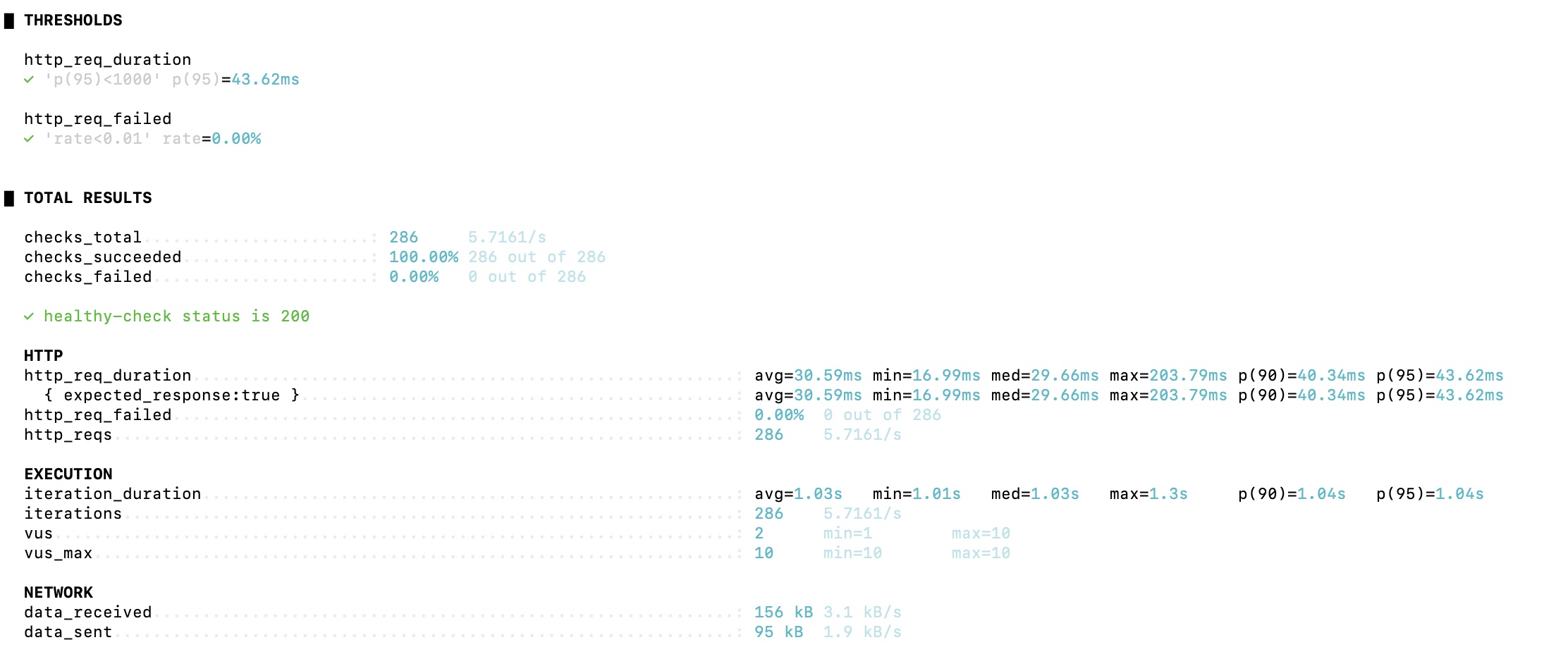
3. 부하테스트 진행
세 가지 핵심 API (진행중인 할 일 목록 조회하기, 24시간 내에 할 일 생성한 친구 목록 조회하기, 24시간 내 생성된 할 일 상세 조회하기)는 메인 페이지에서 가장 빈번하게 호출되므로, 해당 API에 대해 부하테스트를 진행하고자 한다.
성능 기준점은 다음과 같은 기준으로 설정했다.
- 가상 유저: 100명
- 초기 단계의 웹사이트나 모바일 앱 기준
- 테스트 시간: 5분
- 일상적인 운영 환경에서 시스템의 기본적인 성능을 측정
- 실패 조건: 95% 요청이 200ms 이하이거나 실패율이 1% 이하
- 200ms는 사용자가 쾌적하게 느끼는 시간이다.
- 메인 페이지의 핵심 API는 거의 모두 성공해야한다.
3-1. 진행 중인 할 일 목록 조회 부하테스트 결과
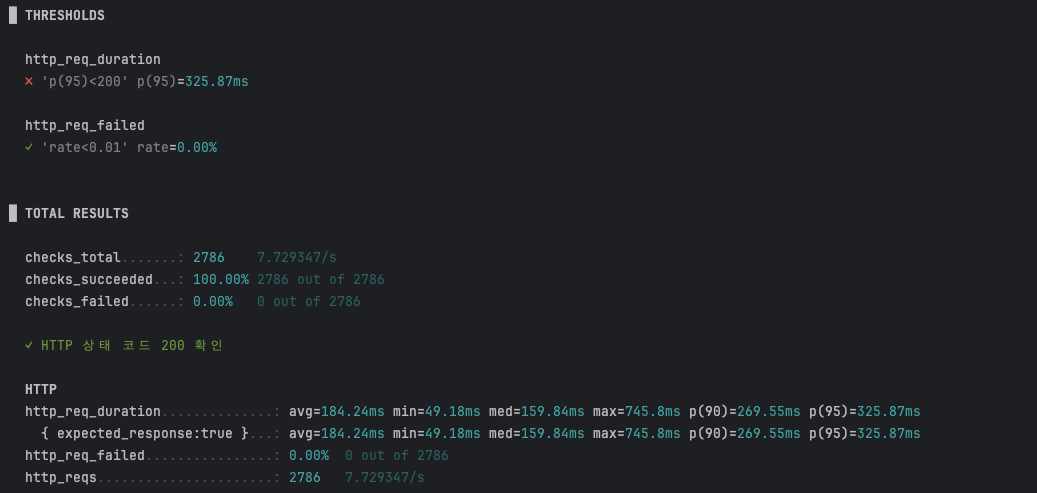
p(95)가 약 325ms로 설정해둔 기준점을 충족하지 못했다.
3-2. 24시간 내 할 일을 등록된 친구 목록 조회

이전에 성능 최적화를 이미 진행해서 그런지 평균적으로 약 38ms 가 소요되어, 설정해둔 threshold를 모두 통과하였다.
4. 부하테스트 결과
부하 테스트를 통해 진행중인 할일 목록 API가 예상보다 지연된다는 사실을 알았다.
5. 문제 해결
진행중인 할 일 목록 API를 호출하면 발생하는 쿼리들은 다음과 같다.
1) 유저정보 조회
Hibernate:
    select
        u1_0.id,
        u1_0.created_at,
        u1_0.email,
        u1_0.modified_at,
        u1_0.nickname,
        u1_0.password,
        u1_0.profile_image_key,
        u1_0.role,
        u1_0.status,
        u1_0.verify_token
    from
        user u1_0
    where
        u1_0.id=?
        and u1_0.status=?
2) 친구 조회
Hibernate:
    select
        case
            when f1_0.from_user_id=?
                then f1_0.to_user_id
            else f1_0.from_user_id
    end
from
    friendship f1_0
where
    (
        f1_0.from_user_id=?
        or f1_0.to_user_id=?
    )
    and f1_0.status='ACCEPTED'
3) 친구들의 진행 중인 할 일 목록 조회
Hibernate:
    select
        t1_0.id,
        t1_0.challenge_time,
        t1_0.created_at,
        t1_0.duration_time,
        t1_0.end_image,
        t1_0.modified_at,
        t1_0.start_image,
        t1_0.status,
        t1_0.title,
        t1_0.user_id
    from
        todo t1_0
    left join
        user u1_0
            on u1_0.id=t1_0.user_id
    where
        u1_0.id in (?, ?, ?, ?, ?, ?, ?, ?, ?, ?, ?, ?, ?, ?, ?, ?, ?, ?, ?, ?, ?, ?, ?, ?, ?)
        and t1_0.status=?
    order by
        t1_0.created_at desc
    limit
        ?
4) 갯수 조회
Hibernate:
    select
        count(t1_0.id)
    from
        todo t1_0
    left join
        user u1_0
            on u1_0.id=t1_0.user_id
    where
        u1_0.id in (?, ?, ?, ?, ?, ?, ?, ?, ?, ?, ?, ?, ?, ?, ?, ?, ?, ?, ?, ?, ?, ?, ?, ?, ?)
        and t1_0.status=?
5) 각 친구별로 이미지 조회 (10번 반복)
Hibernate:
    select
        u1_0.id,
        u1_0.created_at,
        u1_0.email,
        u1_0.modified_at,
        u1_0.nickname,
        u1_0.password,
        u1_0.profile_image_key,
        u1_0.role,
        u1_0.status,
        u1_0.verify_token
    from
        user u1_0
    where
        u1_0.id=?
...
Hibernate:
    select
        u1_0.id,
        u1_0.created_at,
        u1_0.email,
        u1_0.modified_at,
        u1_0.nickname,
        u1_0.password,
        u1_0.profile_image_key,
        u1_0.role,
        u1_0.status,
        u1_0.verify_token
    from
        user u1_0
    where
        u1_0.id=?
위 5번 쿼리에서 N+1 문제가 발생하고 있는 것을 볼 수 있다. 할 일 목록을 조회한 후, 이후에 따로 친구들의 프로필 이미지를 따로 조회하고 있기 때문이다. 처음에는 @EntityGraph를 Todo와 User 정보를 한 번에 가져와 N+1 문제를 해결하였다.
@EntityGraph(attributePaths = {"user"})
    Page<Todo> findAllByUserIdInAndStatus(List<Long> friendIds, TodoStatus status, Pageable pageable);
하지만 코드 수정 결과 다음과 같이 단 네 번의 쿼리만으로 조회가 가능해졌지만, 불필요한 정보를 너무 많이 조회하게 되었다.
Hibernate:
    select
        u1_0.id,
        u1_0.created_at,
        u1_0.email,
        u1_0.modified_at,
        u1_0.nickname,
        u1_0.password,
        u1_0.profile_image_key,
        u1_0.role,
        u1_0.status,
        u1_0.verify_token
    from
        user u1_0
    where
        u1_0.id=?
        and u1_0.status=?
Hibernate:
    select
        case
            when f1_0.from_user_id=?
                then f1_0.to_user_id
            else f1_0.from_user_id
    end
from
    friendship f1_0
where
    (
        f1_0.from_user_id=?
        or f1_0.to_user_id=?
    )
    and f1_0.status='ACCEPTED'
Hibernate:
    select
        t1_0.id,
        t1_0.challenge_time,
        t1_0.created_at,
        t1_0.duration_time,
        t1_0.end_image,
        t1_0.modified_at,
        t1_0.start_image,
        t1_0.status,
        t1_0.title,
        t1_0.user_id,
        u2_0.id,
        u2_0.created_at,
        u2_0.email,
        u2_0.modified_at,
        u2_0.nickname,
        u2_0.password,
        u2_0.profile_image_key,
        u2_0.role,
        u2_0.status,
        u2_0.verify_token
    from
        todo t1_0
    left join
        user u1_0
            on u1_0.id=t1_0.user_id
    join
        user u2_0
            on u2_0.id=t1_0.user_id
    where
        u1_0.id in (?, ?, ?, ?, ?, ?, ?, ?, ?, ?, ?, ?, ?, ?, ?, ?, ?, ?, ?, ?, ?, ?, ?, ?, ?)
        and t1_0.status=?
    order by
        t1_0.created_at desc
    limit
        ?
Hibernate:
    select
        count(t1_0.id)
    from
        todo t1_0
    left join
        user u1_0
            on u1_0.id=t1_0.user_id
    where
        u1_0.id in (?, ?, ?, ?, ?, ?, ?, ?, ?, ?, ?, ?, ?, ?, ?, ?, ?, ?, ?, ?, ?, ?, ?, ?, ?)
        and t1_0.status=?
따라서 Projection 객체를 사용하여 필요한 데이터만 조회하였다.
@Query("SELECT new org.example.ctrlu.domain.todo.dto.projection.TodoProjection(" +
            "       t.id, u.nickname, t.createdAt) " +
            "FROM Todo t JOIN t.user u " +
            "WHERE u.id IN :friendIds AND t.status = :status")
    Page<TodoProjection> findTodoProjectionsBy(
            @Param("friendIds") List<Long> friendIds,
            @Param("status") TodoStatus status,
            Pageable pageable
    );
또한 추가적으로 커버링 인덱스를 생성하여 성능을 극대화하였다. (접근 row 수 5000->10)
CREATE INDEX idx_todo_on_user_and_status_and_created_at ON todo (user_id, status, created_at);

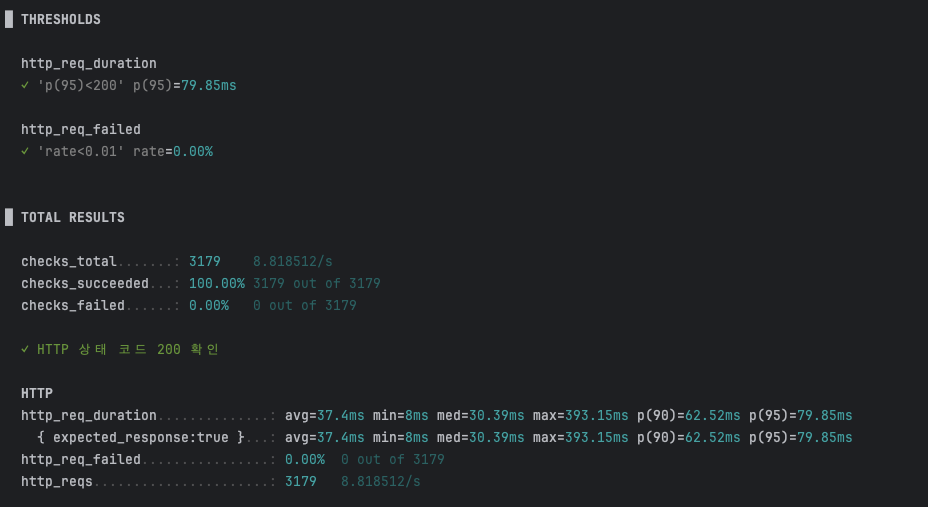
최종적으로 p(95)를 325.87ms-> 79.85ms로 줄여 부하테스트를 통과할 수 있게 되었다.
'Coding > 사이드 플젝' 카테고리의 다른 글
| [CtrlU] 성능 개선 (2) | 2025.08.28 |
|---|---|
| [CtrlU] 메트릭 모니터링 대시보드 구축 (0) | 2025.08.24 |
| [배달뚝배기] 인덱스와 배치를 적용한 성능 최적화 (4) | 2025.08.20 |
| [CtrlU] 로그 모니터링 대시보드(Fluent Bit+OpenSearch) (1) | 2025.07.02 |
| [팔레트] 스프링 시큐리티와 Refresh Token 제대로 알고 사용하기 (0) | 2025.05.24 |